Fix an attendance record
Overrides exist because reality does not fit a QR code. A flat battery, a broken phone, a genuine absence with a genuine reason — all of it gets settled here.
Override one student
- Open the session from the group's Sessions tab.
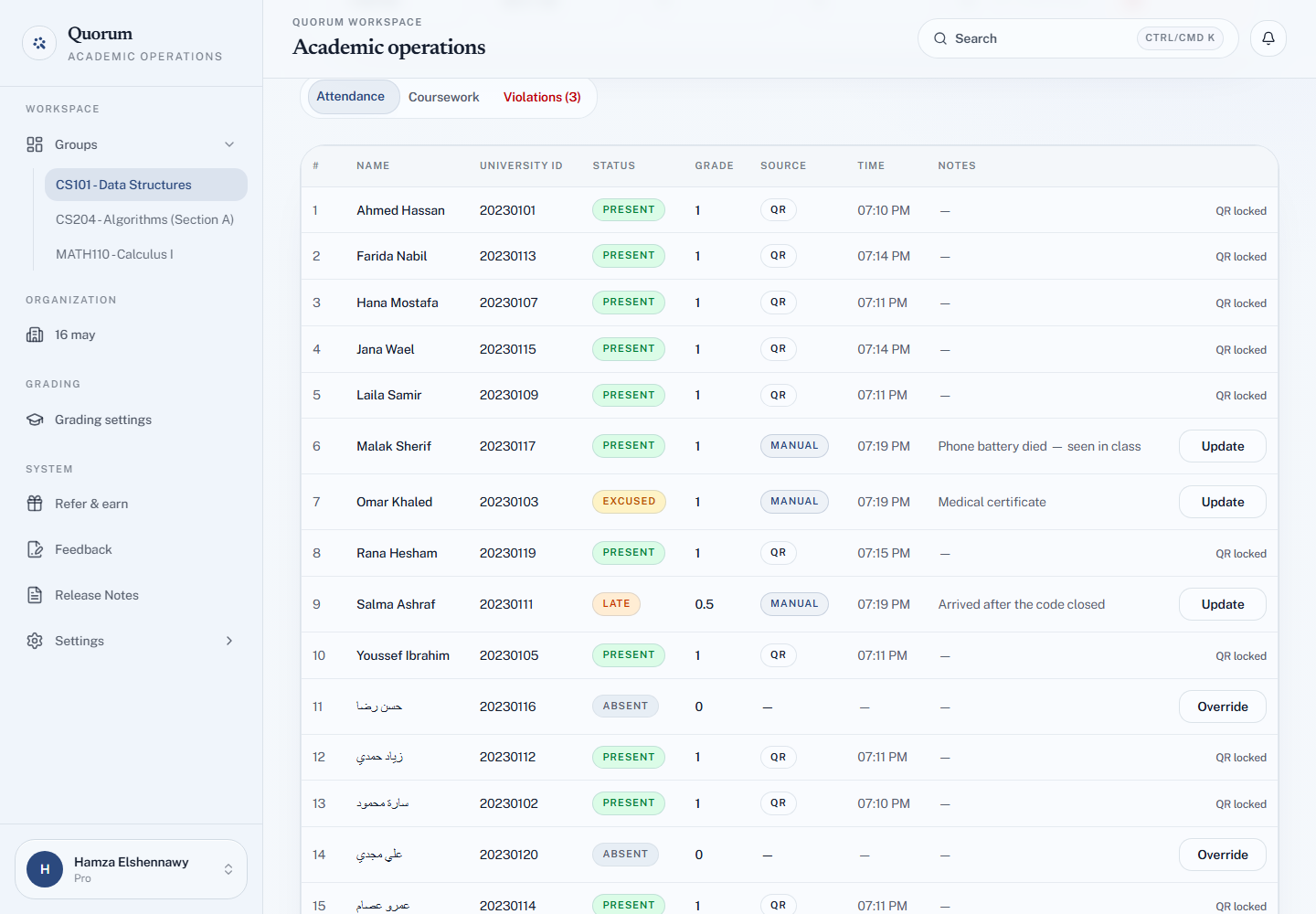
- On the Attendance tab, find the student and choose Override — or Update, if their status was already set by hand.
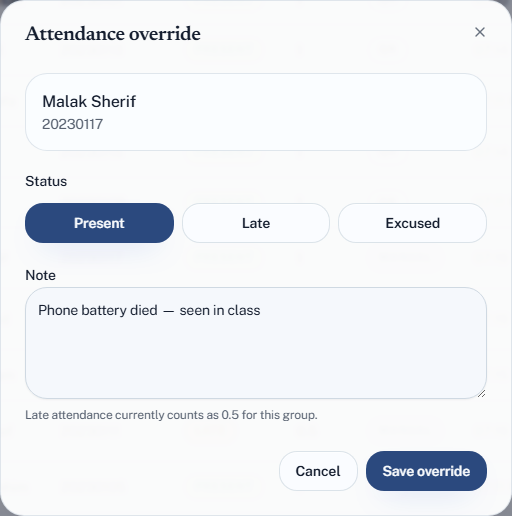
- In the Attendance override dialog, choose Present, Late or Excused, and add a Note if you want one ("Medical certificate").
- Choose Save override.
The dialog also reminds you what late is currently worth in this group, so you are not choosing blind.
What you can and cannot override
A student who scanned is locked. Their row shows QR locked instead of a button. A QR check-in is the record of a scan that happened, and Quorum will not replace it by hand — so you cannot turn a scanned student into late or excused, or remove them.
You cannot set a student back to absent. Absent is the absence of a record, and an override always writes one. Choose carefully; a student you marked present by mistake can be moved to late or excused, but not back to absent.
So overrides are for two kinds of row:
- Absent students — no scan, no record yet
- Students whose status you already set by hand — you can change it again
The three statuses you can set
| Status | Use when |
|---|---|
| Present | They were there. The check-in failed, not the attendance |
| Late | They were there, but after your threshold |
| Excused | They were absent with a reason you accept |
Excused is worth using properly
Excused is not "absent but I feel bad about it". It carries its own grade value — by default 0, but you can set it to anything, including full marks.
That makes it the right tool for illness, university business, or an approved absence: the student is not marked present when they were not there, but is not penalised either. Set the excused value once in grading settings and the policy applies itself all term.
When to override rather than re-scan
Override when the session is over, or when re-scanning would be theatre — the student is standing in front of you and you know they attended.
Ask for a re-scan when the session is still live and the failure is fixable in seconds: a mistyped ID, a stale code. See When a check-in fails.
If a check-in fails during class, the honest move is usually to override immediately and move on. Thirty students watching you debug one phone is worse than a hand-marked record.
Overrides are recorded as overrides
Every row has a Source: QR for a scan, Manual for an override, with your note beside it. That is deliberate: it keeps your record honest, and it means a session that is 80% overrides looks different from one that ran cleanly — which is a signal about your setup, not about your students.
Each override is also written to the group's Activity log with who set it and when, so "it used to say absent" is a fact you can look up rather than a memory. See The activity log.
If you find yourself overriding constantly, something upstream is wrong. Suspect the geofence radius first.
Fixing after the fact
Overrides work on ended sessions. A student who comes to you a week later showing they were in class can be corrected then — open the session from the group, or find it in their record.
A TA can set overrides, on any session in the group, without the owner. The same rules apply: QR check-ins are locked for everyone.