Import past attendance
If you started the term on paper or in a spreadsheet and are moving to Quorum mid-way, you do not have to abandon the weeks you already recorded.
Importing historical attendance creates the past sessions and fills in each student's status in one pass.
When to use this
- Switching to Quorum in week six with five weeks of records already kept.
- Consolidating a colleague's spreadsheet into a group you now run.
It is not for correcting a session Quorum already recorded — use overrides for that.
Prepare the file
One row per student, one column per past session:
| Name | ID | Week 1 | Week 2 | Week 3 |
|---|---|---|---|---|
| Ahmed Hassan | 20191234 | present | late | present |
| Sara Mahmoud | 20195678 | present | absent | excused |
Students must already be in the group. Import your class list first — see Import students from a spreadsheet — because attendance is matched to existing students by university ID. Unknown IDs are skipped.
Accepted values
Each session column takes any of:
present late excused 1 yes true
Anything unrecognised is skipped rather than guessed at. A blank cell means no record, which becomes absent.
Import
- Open the group's Sessions tab and choose Import Past Attendance.
- Upload the file under Excel Or CSV File.
- Pick the Student ID Column.
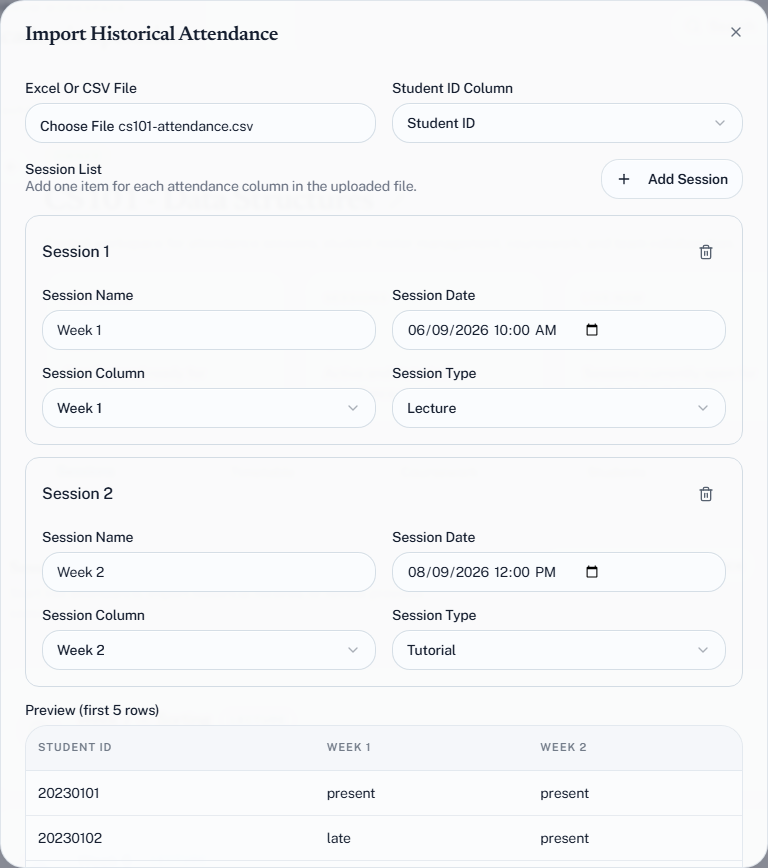
- Under Session List, fill in one entry per past session: a Session Name, the Session Date, the Session Column it comes from, and its Session Type — lecture or tutorial. Choose Add Session for each further column.
- Check the Preview (first 5 rows), then choose Import Attendance.
Quorum reports how many attendance records were imported and across how many sessions.
Check the result
Import creates real sessions, so they appear in the group's session list dated and categorised like any other. This is also the one place you choose a session's category yourself — live sessions take theirs from who starts them. Open one and confirm the statuses landed where you expected before importing the rest of the term.
Import one week first as a test. Getting the mapping wrong across twelve columns means twelve sessions to clean up; getting it wrong across one means one.
Limits worth knowing
Imported sessions count towards your monthly session quota the same as live ones. Importing a twelve-week backlog onto a Free plan will consume a meaningful share of the 60 you get that month. See What counts against your limits.