How Quorum stops proxy check-ins
The problem every QR attendance system has: a student in the room photographs the code, sends it to a friend at home, and the friend checks in.
Quorum puts three layers in the way. This page explains what each one does, and — just as importantly — what it does not.
Layer 1: the code keeps changing
The QR code rotates by default, a new one every 15 seconds. Each code is valid only for its own window.
Stops: the screenshot forwarded over WhatsApp. By the time it is opened, it is dead.
Does not stop: a friend on a live video call, watching the screen in real time. Rotation defeats a stale code, not a live relay.
You can disable rotation for a session that needs a fixed code. Understand that this removes the layer entirely.
Layer 2: device identity
Quorum identifies the browser each check-in comes from, in two ways that are treated differently.
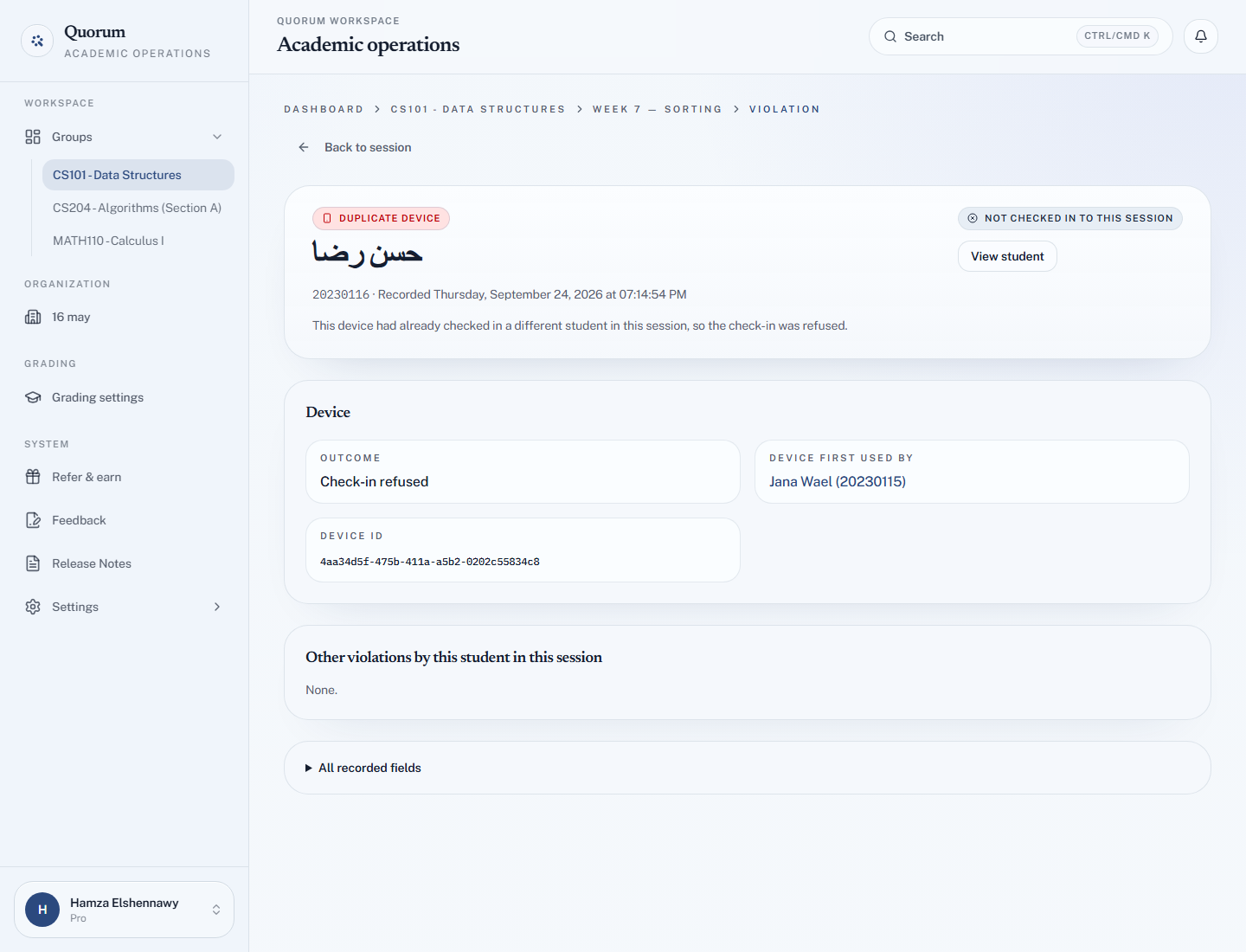
A device ID — the hard check. Every browser gets a persistent ID, stored in more than one place so that clearing cookies alone does not produce a fresh one. If the same ID checks in two different students in one session, the second is refused:
This device has already been used to check in another student. Your attempt has been recorded.
It appears in the session's Violations tab as Duplicate device, naming the student who used the device first.
A device fingerprint — the soft check. Quorum also derives a fingerprint from the phone's hardware and browser. Two identical phones of the same model can share one, so a match is not treated as proof: the check-in is allowed, and flagged as Similar device for you to review. The student sees their check-in succeed, with a note that a device similarity was flagged.
Stops: the common real case — one student in the room checking in three friends from their phone. This is the layer that does most of the actual work, because it targets what students actually do.
Does not stop: three friends who each hand over their own phone.
A browser that cannot be identified at all is refused rather than waved through:
Your browser could not be identified. Please re-open the check-in link in your normal browser and try again.
That is why some private windows and stripped-down in-app browsers fail. A request with no device identity is treated as the device check being evaded, not as a check that did not apply.
Layer 3: the geofence
If enabled, the student's browser must report a location within your radius. See Set a location geofence.
Stops: casual check-ins from home by someone unwilling to fake GPS.
Does not stop: anyone willing to fake GPS. Coordinates come from the student's device, and there are free tools for changing them.
Out-of-range attempts are recorded with the distance, so the corridor and the next city are distinguishable. A phone that sends no location at all is refused but not recorded as a violation — nobody was measured.
What the layers prove, together
| Catches | Misses | |
|---|---|---|
| Rotating code | Forwarded screenshots | Live video relay |
| Device ID | One phone, several students — refused | Several phones |
| Device fingerprint | Look-alike devices — flagged, not refused | Anything it cannot tell apart from a twin phone |
| Geofence | Casual remote check-in | Deliberate spoofing |
Together they make casual cheating genuinely inconvenient. That is a real result — most cheating is casual.
None of this authenticates the student. Quorum identifies a student by university ID alone. A person holding a valid code, standing in the room, who knows a classmate's ID can check that classmate in, and no layer here will notice.
The record is strong evidence of a device being in the right place at the right time. It is not proof of who was holding it.
Reading the Violations tab
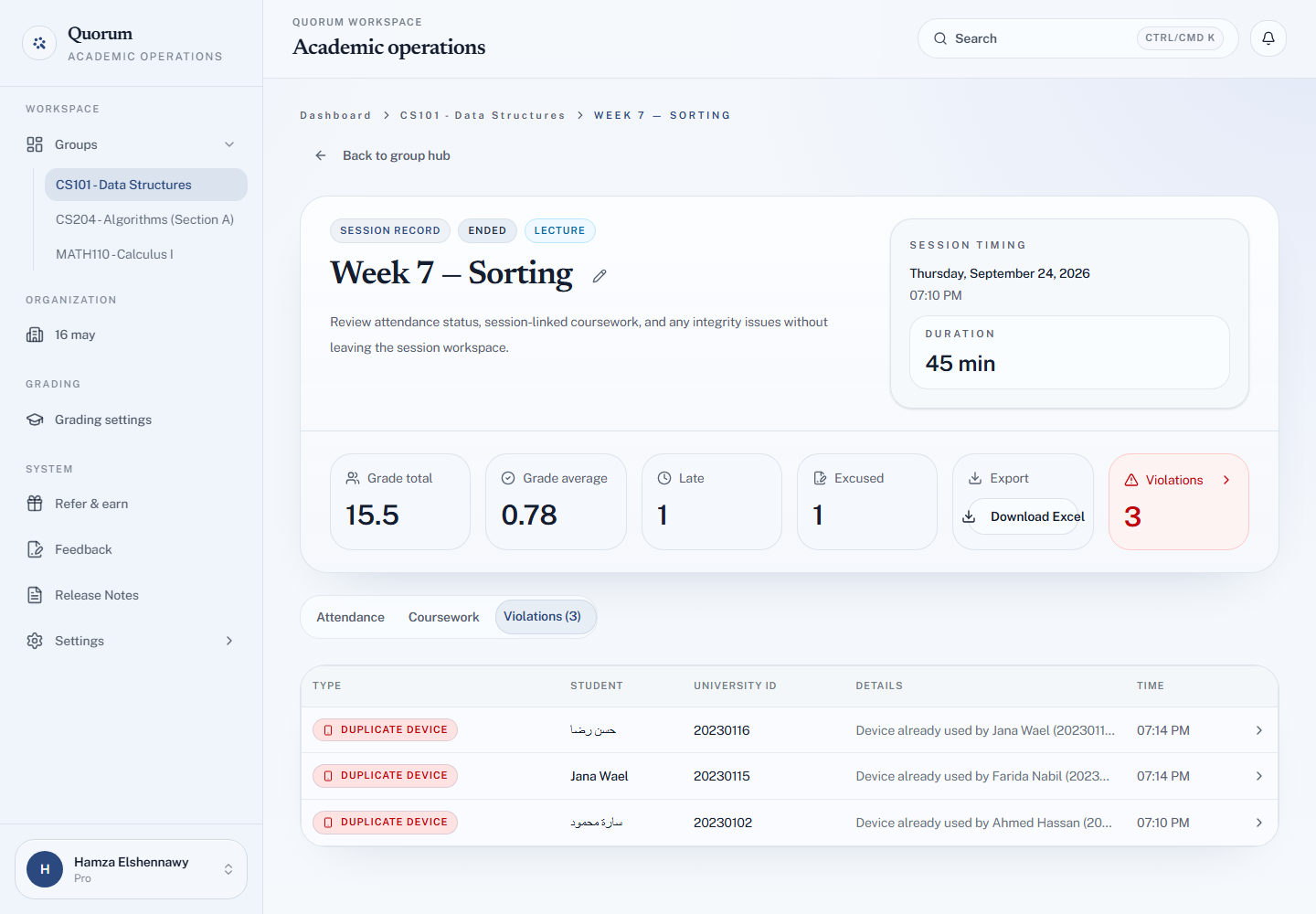
The session record has a Violations tab with a count. Each entry is one of three kinds:
| Kind | What happened | Outcome |
|---|---|---|
| Out of range | The phone reported a position outside your radius | Check-in refused |
| Duplicate device | This device ID had already checked in a different student | Check-in refused |
| Similar device | The fingerprint matched a device that checked in a different student | Check-in allowed, flagged for review |
Open any entry for its detail page: when it was recorded, whether the student checked in later anyway, the student who used the device first, the distance and allowed radius with a small map, the phone's reported accuracy, any other violations by the same student in that session, and every field Quorum recorded.
Read it as a list of things worth a look, not a list of guilty parties. Innocent explanations are common:
- Duplicate device — a student whose phone died borrowing a friend's. Refused, recorded, and completely innocent.
- Similar device — two students with the same phone model. Common in a large class, and the reason this kind is only a flag.
- Out of range — a large building, a bad GPS fix, a fence set too tight. Compare the distance with the phone's accuracy before reading anything into it.
Handling a suspected case
- Look at the record before speaking to anyone. Distance, and whether the device signal is repeated across sessions.
- One violation is not a pattern. The same pair of students sharing a device across six sessions is.
- Ask. Most of these have ordinary explanations, and asking costs nothing.
- Do not present it as proof. Say what the system observed — "your check-in came from the same device as another student's, three weeks running" — and let the student respond. That is defensible. "The system proves you cheated" is not.