The eight assessment kinds
Every assessment has a kind — the Type field when you create it. It is a label, but not only a label: the breakdown groups assessments into weighted categories by kind, so the kind you choose decides which slice of the course grade a mark lands in.
The eight
| Kind | For |
|---|---|
| Quiz | Short, frequent, low-stakes tests |
| Assignment | Work done outside class and handed in |
| Worksheet | In-class exercises, problem sheets |
| Midterm | A major assessment during the term |
| Final Exam | The end-of-course assessment |
| Practical | Lab work, studio work, demonstrations |
| Participation | A mark for engagement rather than a specific artefact |
| Other | Anything that does not fit |
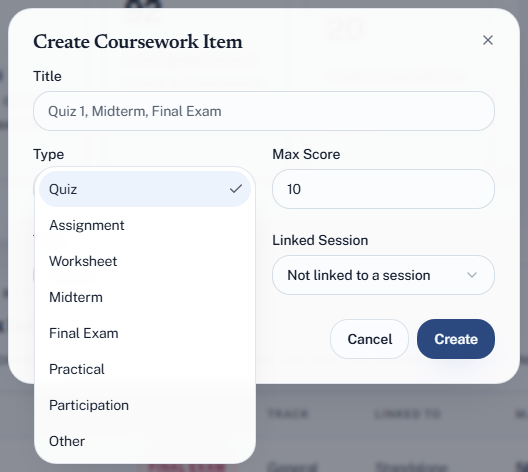
Choosing well
Match the kind to how it should be weighted, not to what it is called. If your course has a "project" that carries the weight of a midterm, making it a midterm puts it in the right category. Naming it accurately in the title and choosing the kind by weight is usually the right trade.
Be consistent across the term. Ten things called quizzes and one identical thing called other means the last one lands in a different category and is weighted differently. That is the most common way a course grade comes out wrong.
"Other" is a real answer. It exists so you are not forced into a lie, and the default breakdown includes it alongside assignments and worksheets. But if half your assessments are "other", the categories are not describing your course — redesign the breakdown instead.
Exams
Three kinds can become exams — delivered in Quorum and sat by students on their own devices: Quiz, Midterm and Final Exam. Those rows get an Exam Setup button in the coursework list; the other five kinds do not. This is a Pro feature.
If you want to deliver something online that is not really a quiz — a practice test, say — make it a quiz.
Where the kind shows up
- As a badge on the assessment, so a list is scannable
- As the grouping the breakdown uses for its categories
- In exports
The kind is translated for display, so an Arabic reader sees Arabic labels while the underlying data is unchanged.