Export grades
Export when you need to do something Quorum does not — submit to a university system, merge with marks kept elsewhere, or apply your own final adjustments.
Export the coursework sheet
From the group's Coursework tab, choose Download Coursework. You need students and at least one assessment; Quorum tells you which is missing rather than producing an empty file.
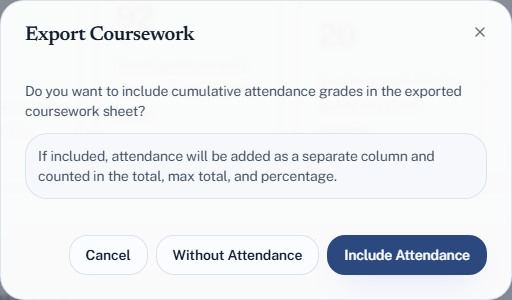
You will be asked one question:
Do you want to include cumulative attendance grades in the exported coursework sheet?
Including it adds attendance as its own column and counts it in the total, max total and percentage. So the two answers give genuinely different sheets: one is a coursework record, the other is closer to a course grade. Pick according to what you are about to do with it.
What the columns mean
| Column | Is |
|---|---|
| Name, University ID | The student |
| Attendance | Their attendance grade, if you included it |
| Raw | The mark as awarded, per assessment |
| Weighted | That mark after the breakdown's weighting |
| Raw Total / Raw Max Total | Marks earned and available, unweighted |
| Raw Percentage | Raw total over raw max |
| Weighted Total / Weighted Max | The same after weighting |
| Weighted Percentage | The course grade |
Weighted Percentage is the one to submit. Raw Percentage answers "what fraction of available marks did they get", which is not the same thing and will differ wherever your weights are not proportional to max scores.
Export attendance grades
Separately, Download Cumulative Attendance on the group's Sessions tab opens Export Attendance Grades. It shows the grading policy it is about to use; Export Excel then produces an attendance-only sheet using those rules, with late and excused sessions still marked visually so the totals can be checked rather than trusted.
Excel only
Every export is an Excel workbook (.xlsx), which keeps the visual marking on
late and excused sessions and keeps Arabic names intact. If another system needs
CSV, open the file in Excel and use Save As → CSV UTF-8; plain "CSV" can
turn Arabic into ????.
Exports are a snapshot
The file reflects the moment you exported it. Marks entered afterwards are not in it. If you are submitting grades, export last rather than first, and check that grading coverage is complete before you do.