Review attempts
Exams are on the Pro plan.
Attempt activity on the exam setup page tracks who has entered, who has submitted, and where each attempt stands.
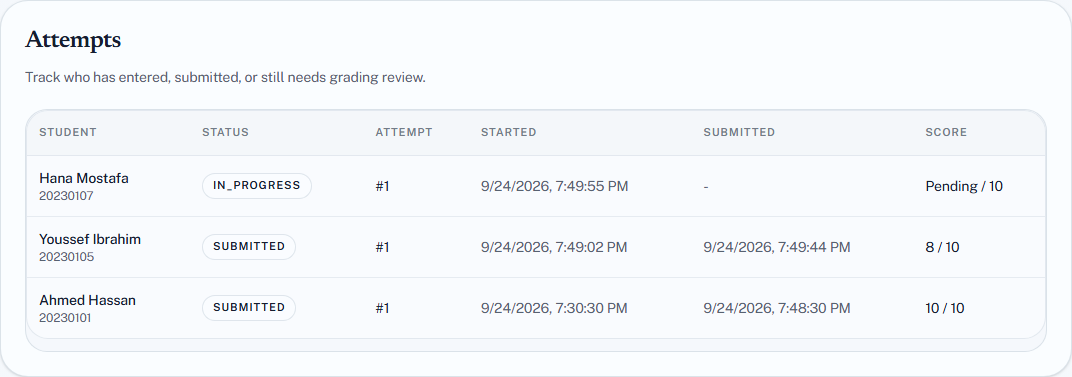
Attempt states
| State | Means |
|---|---|
| In progress | Started, timer running, not yet submitted |
| Submitted | Finished and scored |
| Timed out | The duration ran out; submitted with whatever was answered |
Timed out is not a failure state. The attempt is scored exactly like a submitted one — answered questions count. A student who ran out of time on the last two questions is scored on the rest, not zeroed.
Scoring is automatic
Both question types are objective, so an attempt is scored the moment it is submitted or times out. There is no marking queue and nothing waiting on you.
Each attempt records its score against the exam's total points.
What to check afterwards
Did everyone get in? Compare the attempt count against your class list. Students missing entirely are the ones to chase — they usually could not get through the door rather than choosing not to sit. See Exam troubleshooting.
Did anyone time out unexpectedly? One or two is normal. A third of the class means your duration was too short for the paper, which is about your exam, not your students.
Does any question show an implausible pass rate? A question everyone got wrong is usually a broken question — a mismarked correct option, an ambiguous prompt — rather than a cohort that uniquely failed to learn one thing.
Are there integrity signals worth a look? See Exam integrity, and read them with the care that page argues for.
Adjusting a score
An exam score is a coursework grade. If you need to change one — a question turned out to be wrong, a student had a documented failure — edit it through the assessment like any other grade. See Enter grades.
That is also how you handle a broken question across the whole cohort: fix the grades rather than the question, since editing questions is locked once attempts exist.
Giving another attempt
Governed by Max attempts. If a student needs another go — a genuine technical failure — raising the limit lets them start a fresh attempt.
Raising it applies to everyone, not one student. For an individual case, either accept that and rely on the attempt log to show who used what, or handle it outside the exam by setting the grade directly.