Write questions
Exams are on the Pro plan.
The two types
| Type | Is |
|---|---|
| Multiple choice | A prompt with several options, exactly one marked correct |
| True/false | A statement the student judges |
That is the complete list. There is no written-answer or essay question. Both types are objective, which is what lets Quorum mark every attempt automatically.
If your assessment needs prose, run it outside Quorum and record the mark as ordinary coursework. Trying to approximate an essay with twenty true/false statements is usually a worse exam than the one you meant to set.
Add a question
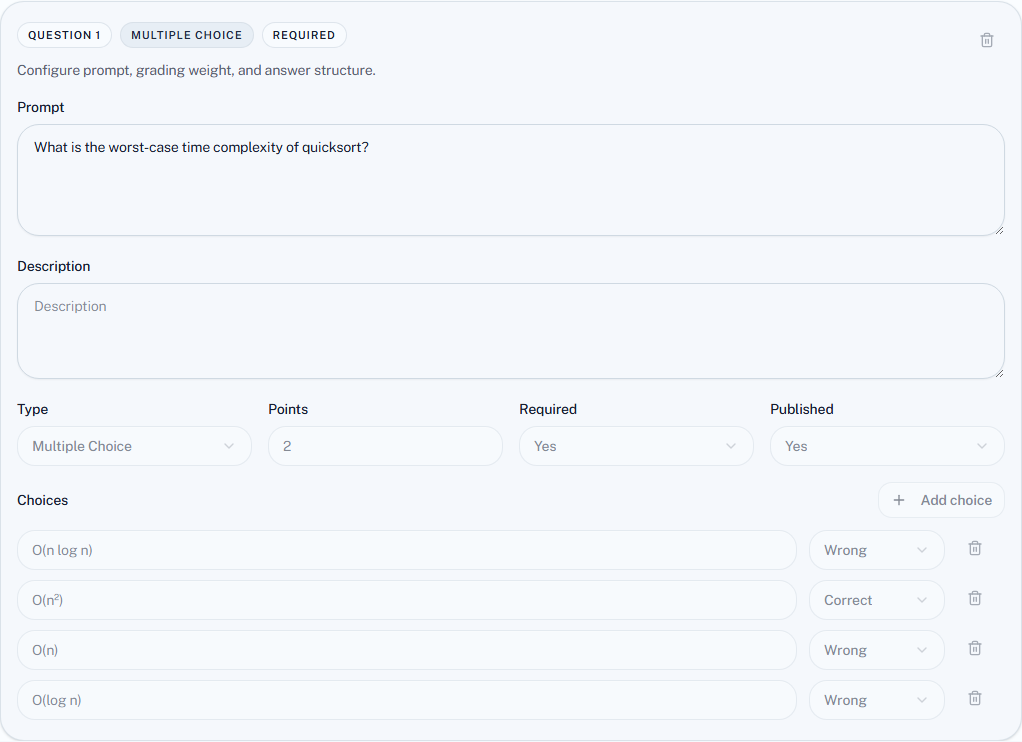
Each question has:
| Field | Notes |
|---|---|
| Prompt | The question itself |
| Description | Optional. Shown to the student as a Question group heading above the prompt — use it for a shared passage, a section name, or a clarification |
| Type | Multiple choice or true/false |
| Points | What it is worth. Questions need not be equal |
| Required | Whether it must be answered |
| Published | Whether students see it — a draft can wait unpublished |
| Choices | The options, each marked Correct or Wrong. Exactly one must be correct |
Add questions with Add question, then choose Save question set. A question with no prompt, or with no correct choice or more than one, is refused at save.
Points
Points are per question and need not be uniform — a question requiring three steps can be worth three times one that requires recall.
The total across questions is what an attempt is scored out of, and the result is then scaled to the assessment's max score in the grade table. A paper worth 10 points on a quiz out of 20 records a 7/10 as 14. The setup page's final review says so whenever the two differ.
Writing choices that work
Wrong options should be plausible. An option nobody would pick is not doing any work, and a question with one real answer and three jokes is a true/false question wearing a costume.
Watch for giveaways. The longest option, the only grammatically matching one, or the only one with a hedge in it — students find these without knowing the material.
Beware "all of the above" with shuffled choices, which reorders the options and makes positional phrasing nonsense.
Publishing questions
Questions have their own published state, so a draft question can sit in the bank without appearing in the exam.
Once a student starts, question editing locks. This protects attempt history — it would not be defensible for a question to change under someone mid-answer.
The practical consequence: proofread before you open access, not after. A typo found at minute three is a typo you live with, or an exam you void and re-run.
Before you open the door
- Read every question end to end as a student would.
- Check exactly one correct option is marked on each multiple-choice question, unless you intend multiple.
- Add up the points and compare to the assessment's max score.
- Check the questions you meant to publish are published.