Switching language
Quorum is available in English and العربية, and the switch is one control away from wherever you are.
Switching
- Signed out — on the sign-in and sign-up screens, the language control is in the header.
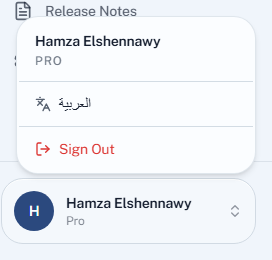
- In the dashboard — open the menu under your name at the bottom of the sidebar. It offers the other language by its own name: العربية from English, English from Arabic.
Choosing it switches immediately — there is nothing to save and no page to hunt for in settings.
What changes in Arabic
Arabic is not a translated overlay on a left-to-right screen. The whole layout mirrors: navigation moves to the right, tables and forms flow right to left, and the interface reads the way an Arabic reader expects it to.
Student names are unaffected either way. A name written in Arabic displays correctly on an English screen and the reverse, so a mixed roster needs no special handling.
Where the choice is stored
Your language is remembered on your device, for a year — not on your account.
Two practical consequences:
- It works before you sign in. The sign-up screens are read by people who do not have an account yet, and they are exactly the people who need it in their own language.
- It does not follow you to another device. Signing in on a lecture-hall computer gives you that machine's language, not the one you use on your laptop. Switch it there once and it will stay.
Your students' check-in screen picks its own language the same way, on their phones, independently of yours.
Quorum has no light/dark switch. The interface is light in every browser, whatever your operating system is set to.