Import students from a spreadsheet
Import takes a class list straight from the registrar's export. You do not need to reformat it first — you tell Quorum which columns to read.
Prepare the file
Excel (.xlsx) or CSV. It needs two things somewhere in it:
- a column of student names
- a column of university IDs
And, if you have it, a third:
- a column of email addresses — optional, but it is what lets each student see their own attendance
Column headings do not matter. You pick the columns by hand after uploading,
so Student ID, ID No. and الرقم الجامعي all work equally well. Extra
columns — programme, year — are ignored rather than rejected.
Import
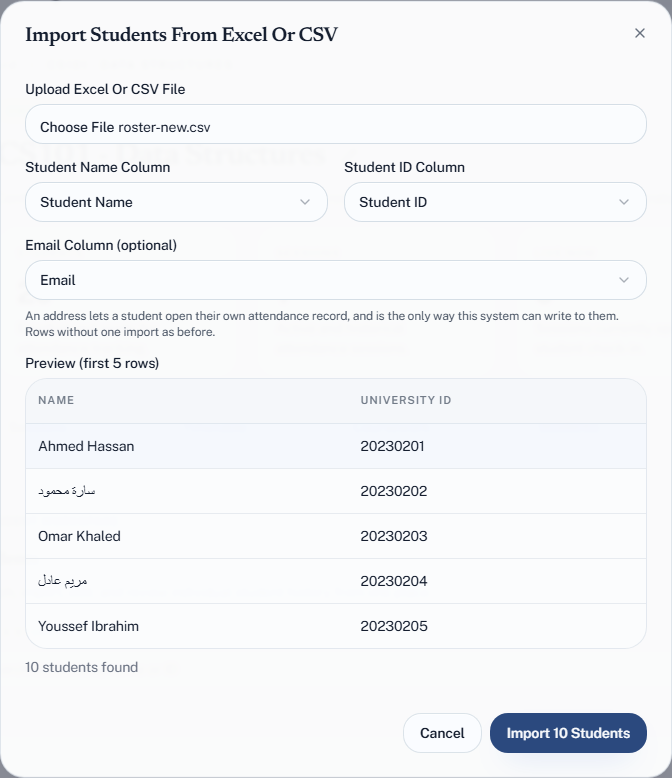
- Open the group's Students tab and choose Import CSV.
- Upload your Excel Or CSV File.
- Set Student Name Column and Student ID Column from the dropdowns. If the file has addresses, set Email Column (optional) too; otherwise leave it on No email column.
- Check the Preview (first 5 rows). This is where a wrong column shows itself — if the preview shows programme codes where names should be, fix it here rather than after importing.
- Choose Import {n} Students.
Read the result
Quorum reports two numbers: how many were imported and how many were skipped.
A row is skipped for one of two reasons:
| Reason | What to do |
|---|---|
| Missing a name or a university ID | Fill the gap in the file and import again |
| That university ID is already in this group | Nothing — the student is already there |
The second case is why re-importing is safe. Running the same file twice does not create duplicates; the second run simply skips everyone. If a class list gains ten students mid-term, re-import the whole updated file and only the ten new ones land.
A skipped count roughly equal to your existing student count means the file was already imported. A skipped count you cannot explain means blank rows or a mis-mapped column — check the file rather than importing again.
If you hit your plan limit
Import counts every student against your account-wide total, and the whole import is refused rather than partially applied if it would take you over.
Free allows 300 students across all groups, Plus 1,000, Pro 5,000. See When you hit a limit.
Fixing a bad import
There is no undo. If you imported against the wrong column and now have a group full of nonsense, remove the students by hand and import again — which is the argument for actually reading the preview.
Next
- A student's record
- Import past attendance — if the term is already underway