A student's record
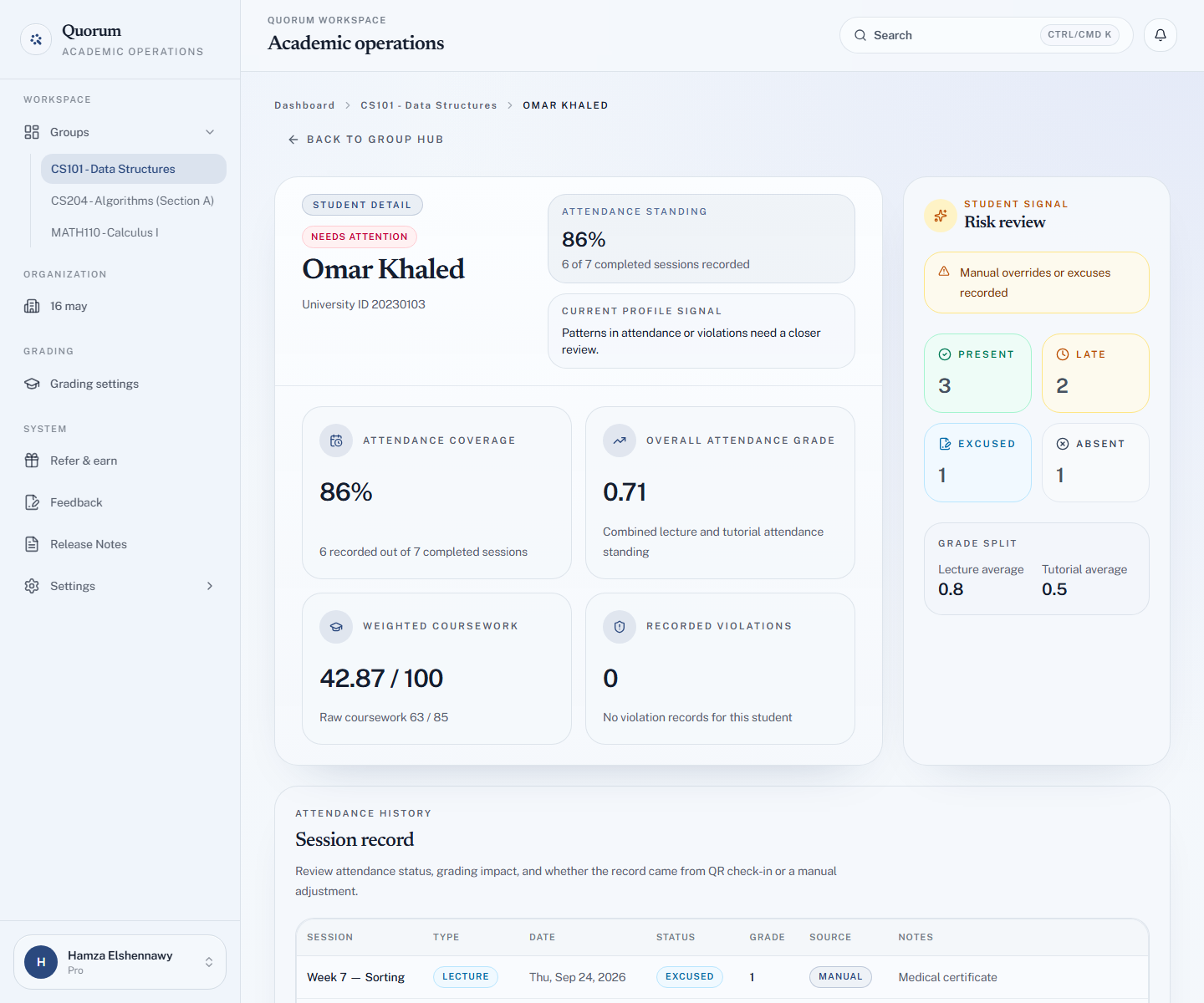
Open a student from the group to see their whole history in your course: attendance session by session, coursework marks, and where they stand overall.
What it shows
Attendance. Every session in the group and what this student was marked as — present, late, excused or absent. Sessions they missed are as much a part of this as the ones they attended.
Coursework. Every assessment they have been marked on, with the score.
The attendance history also shows each record's Source — QR or manual — and any note left with an override.
Their standing. The attendance grade produced by your grading settings, split into a Lecture average and a Tutorial average, and their weighted coursework total from the breakdown.
Violations. Any check-in violations recorded against this student.
A signal. The top of the record says On track or Needs attention. It flags the patterns worth a conversation — several absences in a row, a low lecture or tutorial average, recorded violations, or a history of manual overrides and excuses — and lists which ones it saw.
What to use it for
This is the page to open when a student comes to you with a question, because it answers the two most common ones directly:
- "I was there that day" — you can see what was recorded and correct it on the spot if they are right.
- "How am I doing?" — the record answers it without you assembling anything.
It is also the fastest way to spot a student in trouble early, while there is still term left to do something about it.
Getting here quickly
You do not have to remember which group someone is in. Search their university ID from anywhere in the dashboard and go straight to their record.